AI Ordering Kiosks & Smart Kitchen Automation in 2026
How self-service ordering terminals, voice AI, and automated kitchen fryers lower order errors and boost throughput.

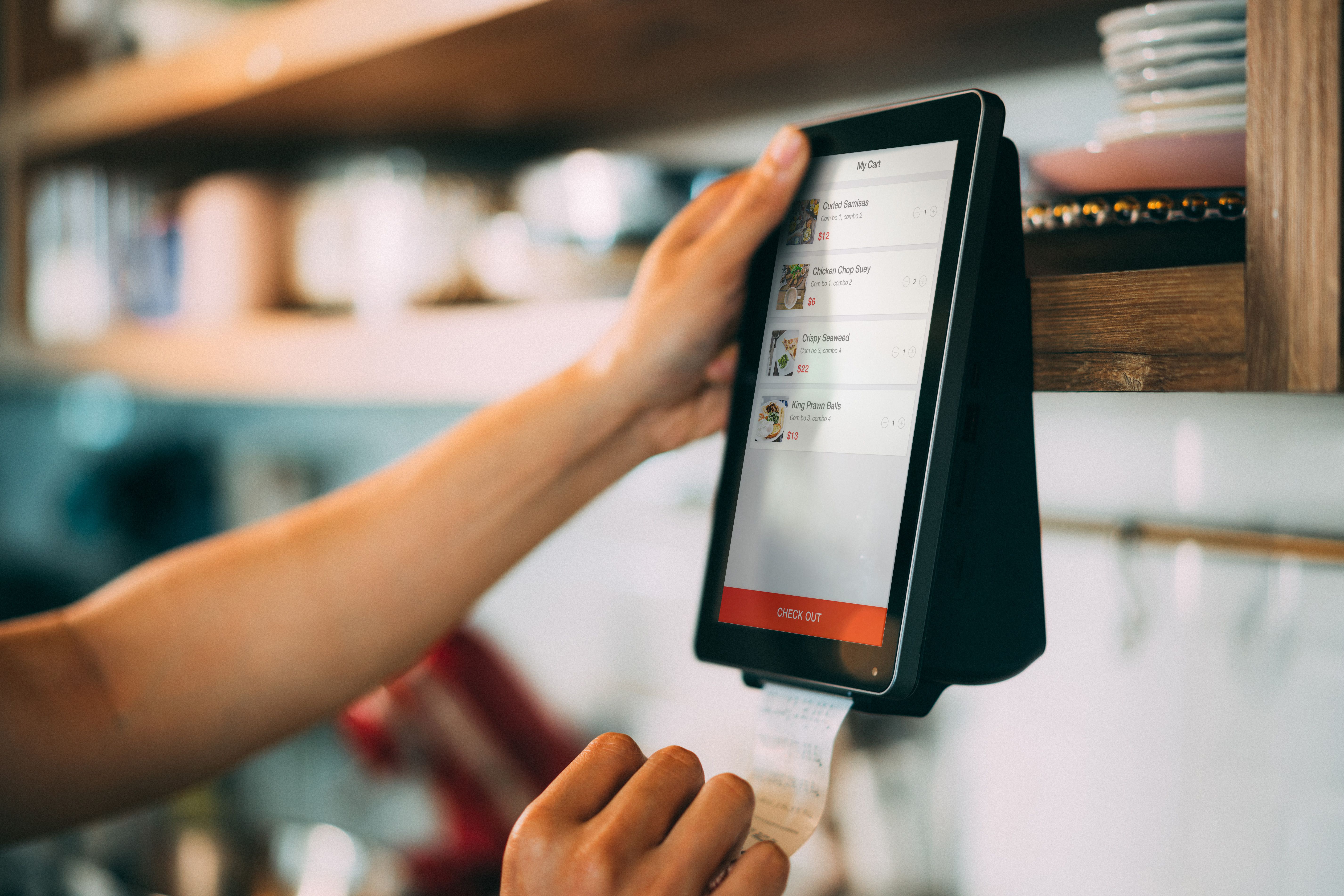
Self-service ordering kiosks powered by artificial intelligence recommendation engines are expanding across QSR and fast-casual dining rooms, driving higher ticket averages and optimizing front-of-house labor.
Introduction: The Rise of Self-Service Dining Rooms
Self-service ordering kiosks have evolved from novel touchscreen displays into primary order-taking infrastructure across quick-service and fast-casual restaurants worldwide. Facing persistent front-of-house labor shortages, rising minimum wages, and growing consumer preference for digital ordering control, operators are replacing traditional cashier lines with sleek kiosk banks. Powered by AI upsell engines, self-service kiosks deliver consistent order accuracy, speed up dining room throughput, and lift average check sizes significantly.
What Are AI-Powered Self-Service Kiosks?
AI ordering kiosks are interactive commercial touchscreen terminals positioned in restaurant lobbies that allow guests to browse visual menus, customize ingredients, place orders, and pay independently. Integrated AI algorithms analyze real-time order selections, store inventory levels, and historical sales trends to dynamically suggest relevant menu upgrades and add-on items during checkout.
How Kiosk Recommendation Engines Work
As a customer selects a burger or grain bowl on the kiosk screen, the AI recommendation engine instantly evaluates high-margin pairing opportunities. It presents tailored prompts (e.g., 'Add avocado for $1.50?' or 'Make it a combo with seasonal lemonade and sweet potato fries?'). Unlike human cashiers who may forget to upsell during busy rushes, AI kiosks present optimized upselling prompts on 100% of transactions without creating awkward sales interactions.
Key Features of Next-Generation Kiosk Systems
Modern restaurant kiosk platforms offer advanced hardware and software capabilities:
- Intelligent Predictive Upselling: Dynamically featuring top-margin side items, double protein upgrades, and premium beverages based on order context.
- Multilingual Visual Interfaces: Instantly switching menu languages (English, Spanish, French, Mandarin) to accommodate diverse guest bases.
- Facial Recognition & Loyalty Auto-Sync: Recognizing opt-in loyalty members to load their favorite past orders instantly upon approach.
- Integrated Contactless Payment Terminals: Supporting tap-to-pay mobile wallets, EMV credit card chips, and gift card scanning.
- Direct Kitchen KDS Synchronization: Routing kiosk orders straight to kitchen displays, eliminating order entry lag times.
Benefits for Restaurant Operators
Deploying ordering kiosks provides substantial financial and operational returns:
- Significant Ticket Size Lift: Kiosk orders consistently yield 12% to 25% higher average check sizes compared to traditional cashier orders due to visual upselling.
- Front-of-House Labor Optimization: Reallocating staff from cashier registers to table delivery, kitchen prep, and dining room cleanliness.
- Elimination of Order Entry Errors: Allowing guests to review custom meal modifications visually before payment reduces kitchen order re-fires.
- Faster Lobby Throughput: Multiple kiosks process dining room rushes simultaneously, eliminating long customer queues during lunch peaks.
Challenges and Implementation Limitations
Successfully deploying kiosks requires thoughtful lobby space planning. Kiosks must be positioned near store entrances without obstructing customer foot traffic or pickup counters. Furthermore, operators must maintain a dedicated hospitality host in the lobby during initial launch weeks to assist guests who are less familiar with touchscreen ordering interfaces.
Implementation Considerations for Store Operations
Operators should invest in high-resolution food photography for kiosk menu screens, as visual appetite appeal is the primary driver of item add-on sales. Ensuring daily screen sanitation and establishing hardware maintenance protocols keeps kiosk banks operating at peak efficiency.
Cost / ROI Considerations for Franchise Owners
Kiosk investment includes hardware terminal purchase/leasing, software licensing, and installation fees. Given the 15%+ average check lift and front-of-house labor savings, kiosk banks typically pay for themselves within 4 to 8 months of store installation.
Best Use Cases Across Restaurant Formats
Self-service kiosks excel in high-volume QSR chains, fast-casual bowl and burger concepts, airport dining venues, and university food courts handling massive student lunch surges.
Future Outlook: Conversational AI & Accessibility
Future kiosks will integrate voice-activated conversational AI and height-adjustable accessibility features, allowing guests to speak orders naturally or interact via gesture controls.
Optimizing Lobby Traffic Flow & Kiosk Layout Architecture
Successful kiosk deployment requires strategic dining room layout design. Positioning kiosk banks near store entrances with clear line-of-sight signage guides arriving guests away from traditional cashier queues. Providing clear separation between kiosk ordering zones and order pickup counters prevents lobby congestion and creates a smooth, intuitive dining room flow.
Streamlining Front-of-House Labor & Order Entry Speed
Deploying self-service ordering kiosks reduces dining room queue lines while allowing front-of-house staff to transition into dedicated hospitality roles. Crew members assist guests at tables, maintain lobby cleanliness, and expedite order handoffs, delivering a higher level of guest service while optimizing store labor budgets.
High-Resolution Food Photography & Visual Appetizing UI
Visual presentation is the single most important factor driving kiosk check size growth. Featuring professional, high-resolution food photography, video loops of sizzle items, and clean customization build screens stimulates appetite appeal and encourages guests to order extra sides and premium drinks.
ADA Accessibility & Universal Screen Design Standards
Commercial ordering kiosks must adhere strictly to ADA reach-height standards, audio prompt guidelines, and high-contrast display modes. Universal design features ensure that guests of all physical abilities can browse menus, customize dishes, and pay independently and comfortably.
Kiosk Screen Sanitation & Daily Hardware Maintenance
Maintaining clean, responsive kiosk screens is critical for positive guest experiences. Store teams follow scheduled cleaning protocols using commercial anti-microbial wipes between meal rushes. Establishing daily hardware maintenance routines ensures touchscreens remain smudge-free, credit card readers function smoothly, and thermal receipt printers stay fully loaded.
Related FoodColumn Coverage
Read our pillar guide in AI Changing the Restaurant Industry, examine QSR prototypes in Drive-Thru Only Restaurant Prototypes, explore kitchen robotics in Kitchen Robotics & Fast Food Automation, and review tech resources in The Essential Restaurant Technology Guide.
Frequently Asked Questions
Why do customers spend more money when ordering on self-service kiosks?
High-resolution food photos, clear customization options, and consistent AI upsell prompts encourage guests to add extra toppings, sides, and premium drinks without feeling rushed.
Do self-service kiosks eliminate front-of-house restaurant jobs?
No. Kiosks allow operators to reallocate staff hours from manual cashier order entry to food preparation, table delivery, and dining room hospitality.
How long does it take for a self-service kiosk system to pay for itself?
Most operators achieve complete kiosk ROI within 4 to 8 months through higher check averages (12%-25% lift) and labor optimization.
Can ordering kiosks accept cash payments?
While most kiosks process card and mobile wallet payments, specialized kiosk models incorporate cash acceptance and change-dispensing hardware modules.
How do kiosks handle customer food allergy requests?
Digital kiosks allow guests to apply allergen filters (e.g., gluten-free, nut-free, dairy-free) to view compliant menu options and clearly customize dish build sheets.